Vertex AI PayGo and Priority
Priority PayGo
LiteLLM supports Priority PayGo.
Send a priority header, get priority queueing, and pay priority token rates.
As of this writing: gemini/gemini-2.5-pro, vertex_ai/gemini-3-pro-preview, vertex_ai/gemini-3.1-pro-preview, vertex_ai/gemini-3-flash-preview, and their variants.
Check supports_service_tier: true in LiteLLM's model pricing JSON.
Send a priority request
Use this header:
X-Vertex-AI-LLM-Shared-Request-Type: priority
- LiteLLM SDK
- Proxy config
- Pass-through mode
import litellm

response = litellm.completion(
    model="vertex_ai/gemini-3-pro-preview",
    messages=[{"role": "user", "content": "Summarize the Gettysburg Address."}],
    vertex_project="YOUR_PROJECT_ID",
    vertex_location="us-central1",
    extra_headers={"X-Vertex-AI-LLM-Shared-Request-Type": "priority"},
)

print(response.choices[0].message.content)
model_list:
  - model_name: gemini-priority
    litellm_params:
      model: vertex_ai/gemini-3-pro-preview
      vertex_project: "YOUR_PROJECT_ID"
      vertex_location: "us-central1"
      vertex_credentials: os.environ/GOOGLE_APPLICATION_CREDENTIALS
      extra_headers:
        X-Vertex-AI-LLM-Shared-Request-Type: priority
curl http://localhost:4000/v1/chat/completions \
  -H "Authorization: Bearer sk-your-key" \
  -H "Content-Type: application/json" \
  -d '{"model": "gemini-priority", "messages": [{"role": "user", "content": "Hello"}]}'
Use x-pass- so LiteLLM forwards provider-specific headers.
MODEL_ID="gemini-3-pro-preview-0325"
PROJECT_ID="YOUR_PROJECT_ID"

curl -X POST \
  "${LITELLM_PROXY_BASE_URL}/vertex_ai/v1/projects/${PROJECT_ID}/locations/global/publishers/google/models/${MODEL_ID}:generateContent" \
  -H "Authorization: Bearer sk-your-litellm-key" \
  -H "Content-Type: application/json" \
  -H "x-pass-X-Vertex-AI-LLM-Shared-Request-Type: priority" \
  -d '{"contents": [{"role": "user", "parts": [{"text": "Hello!"}]}]}'
How cost tracking works
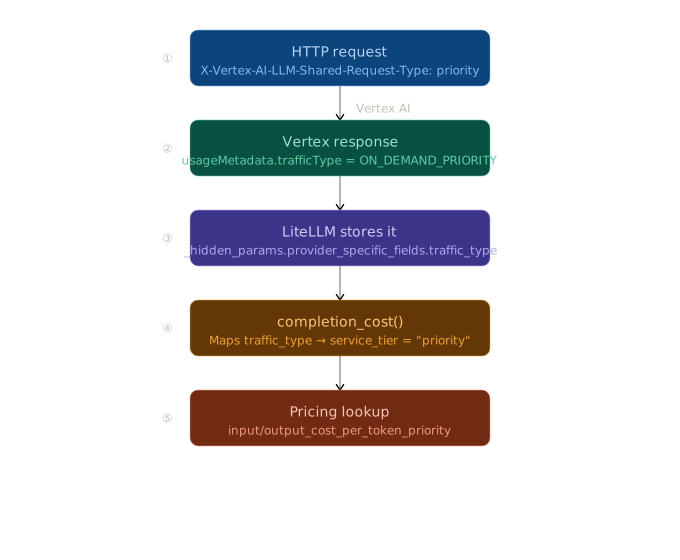
trafficType → service_tier mapping
usageMetadata.trafficType | service_tier | Pricing keys used |
|---|---|---|
ON_DEMAND | None | input_cost_per_token |
ON_DEMAND_PRIORITY | "priority" | input_cost_per_token_priority |
FLEX / BATCH | "flex" | input_cost_per_token_flex |
If a tier-specific key is missing, LiteLLM falls back to standard pricing keys.
Standard PayGo vs Provisioned Throughput
This is a different header from priority routing:
| Header value | Behavior |
|---|---|
X-Vertex-AI-LLM-Request-Type: shared | Force standard PayGo (bypass PT) |
X-Vertex-AI-LLM-Request-Type: dedicated | Force Provisioned Throughput only (429 if exhausted) |
Native route example
import litellm

response = litellm.completion(
    model="vertex_ai/gemini-2.0-flash",
    messages=[{"role": "user", "content": "Hello!"}],
    vertex_project="YOUR_PROJECT_ID",
    vertex_location="us-central1",
    extra_headers={"X-Vertex-AI-LLM-Request-Type": "shared"},
)
Pass-through example
MODEL_ID="gemini-2.0-flash-001"
PROJECT_ID="YOUR_PROJECT_ID"

curl -X POST \
  "${LITELLM_PROXY_BASE_URL}/vertex_ai/v1/projects/${PROJECT_ID}/locations/global/publishers/google/models/${MODEL_ID}:generateContent" \
  -H "Authorization: Bearer sk-your-litellm-key" \
  -H "Content-Type: application/json" \
  -H "x-pass-X-Vertex-AI-LLM-Request-Type: shared" \
  -d '{
    "contents": [{"role": "user", "parts": [{"text": "Hello!"}]}]
  }'
Troubleshooting
Q: What does 403 Permission denied or IAM_PERMISSION_DENIED mean?
A: The service account or Application Default Credentials (ADC) user does not have the roles/aiplatform.user role. To resolve this, re-run the gcloud projects add-iam-policy-binding.
Q: What should I do if I get a 429 Quota exceeded error?
A: This means you've hit the per-region QPM (queries per minute) or TPM (tokens per minute) quota. You can:
- Request a quota increase from the GCP Quotas console
- Add more regions to your LiteLLM configuration for load balancing
- Upgrade to Provisioned Throughput for guaranteed capacity
Q: How do I fix the VERTEXAI_PROJECT not set error?
A: Either pass the vertex_project parameter explicitly in your LiteLLM call, or set the VERTEXAI_PROJECT environment variable before running your code.